How it Works
Workflows made of steps. Steps that do real work.
A Formt workflow is a chain of connected steps. Each step does one piece of real work: reading data from your tools, generating content with AI, sending an email, making a decision. You build it once, and it runs from then on.
Building blocks
Steps, a canvas, and the data that flows between them
Every workflow is built from the same three ingredients. Once you can read them, you can read any workflow in Formt. And you never have to assemble them by hand: describe what you want, and the AI editor builds and edits the workflow for you.
Steps
Each step does one job: read rows from a sheet, pull invoices from Xero, generate an email with AI, render a PDF, post to Slack, wait for a decision. Step types cover data, AI, email, documents, social, CRM, accounting, and flow control, and the catalogue keeps growing.
The canvas
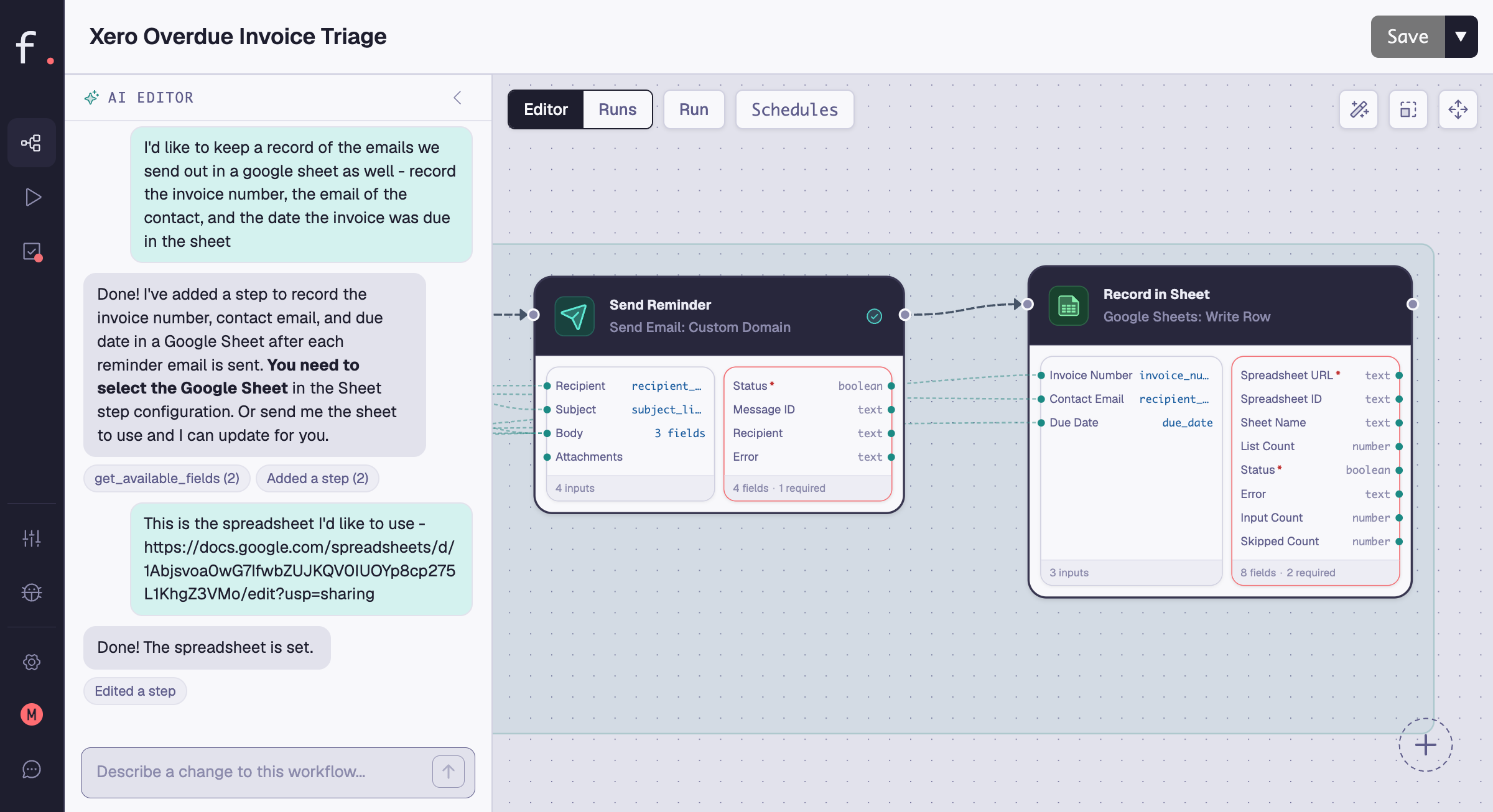
Steps connect on a visual canvas. Click any step to configure it, draw an edge to pass data to the next one, and see the whole workflow at a glance. Whether Formt's AI built it or you did, the canvas shows exactly what will happen and in what order.
The data flow
Data moves between steps through typed field mappings: one step's output becomes the next step's input. A contact name from HubSpot flows into an AI prompt, the AI's draft flows into the email body, and the send result flows into your tracking sheet.
See it in action
From description to running workflow
The run model
What starts a workflow
Once triggered, every run executes the same way: step by step, in order, pausing only where you've asked it to. The difference is what starts it.
On demand
Click Run, fill in any inputs the workflow asks for, and it executes immediately. For one-off jobs: a proposal for a specific client, a report on today's numbers, a single batch of outreach.
Scheduled
Set a cadence and a timezone and the workflow runs itself: overdue invoices every Monday morning, a portfolio report on the 1st. Each run works on whatever is new since the last one.
Form-triggered
Share a form link or embed it on your site, and every submission starts a run with the answers as its inputs: a contact form that routes itself, an intake form that files itself.
Agent-triggered
Formt exposes workflows to external AI agents over MCP. With a personal access token, an agent can list your workflows, start runs, fill in blocked form steps, and requeue failed ones.
Human in the loop
Automation that knows when to stop and ask.
Turn review on for any step, and Formt picks the moment to pause based on what the step does: before it acts if it reaches outside Formt, or after it produces output if it only generates something. Execution pauses, a task lands in the Task Manager, you decide, and the run continues. It's the difference between automation you have to watch and automation you can trust.
Platform capabilities
Go deeper on what Formt can do
Each capability has its own page. Start with the one closest to the problem you're trying to solve.
Autonomous web research with structured output
The Research Agent searches the web, reads full pages, and returns typed fields your workflow can act on directly, not a text blob to parse.
Learn moreExtract, fill, merge, and generate PDFs
Four PDF actions as workflow steps: extract structured data from any PDF, fill form fields, merge files, or generate a new styled PDF from your data.
Learn moreBuilt-in sending, tracking, and suppression
Sending infrastructure, guided domain setup, engagement tracking, automatic bounce suppression, and AI email generation. No SMTP to configure.
Learn moreAI that does the work, with your oversight
AI Generate produces prose, typed structured fields, or ready-to-send emails, and any AI step can pause for your review before its work goes anywhere.
Learn moreOne inbox for every pending decision
Every task waiting on a human, across every workflow, in one view. Review, edit, approve, or reject, with a full record of who decided what.
Learn moreComplete workflows ready to clone
Every template is a full working workflow, not a starting point. Clone one, connect your accounts, and it runs in minutes.
Browse templatesTry it first